Collect patient payments on time, without awkward phone calls
Stream is patient billing and payment collection software for private clinics and medical centers in Saudi Arabia. Take deposits before the visit, split treatment plans into installments you set, and collect self-pay balances by WhatsApp, SMS or email, beside the clinic system you already use.

Patients pay with
mada, Visa, Mastercard, Apple Pay, Samsung Pay

Settlements
To your bank every Sunday, Tuesday and Thursday

Invoices
Arabic and English, with your clinic's logo

No app
Patients pay from a link, with no account to create
Why patient balances go unpaid, and who ends up calling
In many private clinics, reception is also the collections team: following up treatment plan payments by phone, chasing no-shows, and keeping a list of who still owes what.
| Topic | Today | |
|---|---|---|
| Booking | Appointments are booked with no deposit, and a no-show costs the slot | A payment link takes a deposit before the visit, so the slot is paid for |
| Treatment plans | Installment promises sit in a notebook or a spreadsheet | Each installment is charged to the patient's card on its date |
| Following up | Reception calls patients about money between appointments | Polite reminders go out automatically before and after each due date |
| Overdue balances | You find out who owes what at the end of the month | The overdue list shows who owes what, and for how many days, today |
How patient payment collection works with Stream
- 01
Create the bill
From the amount your clinic system approved: one invoice, a payment link, or a CSV file for many patients at once.
 02
The patient gets it on their phone
By WhatsApp, SMS or email, in Arabic or English, with your clinic's logo and colors.
- 03
They pay in full or in installments
With mada, Visa, Mastercard, Apple Pay or Samsung Pay. No app to download, no account to create.
- 04
You see it, and the money settles
Paid, outstanding and overdue balances update as patients pay. Funds settle to your bank every Sunday, Tuesday and Thursday.
See exactly what patients receive
Four screens, the same on every phone. No app to download.
Your clinic's name, the amount and the link to pay.
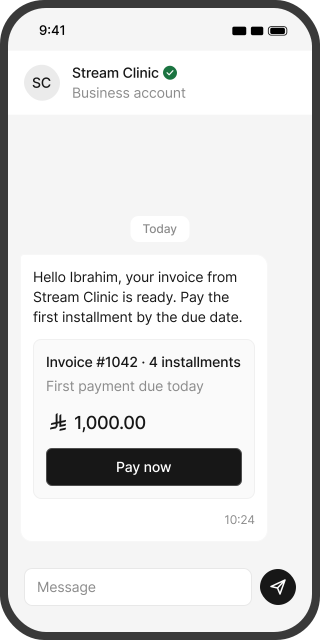
Every self-pay charge, in one place
Insurance claims stay in your clinic system. Stream collects what patients pay themselves.
Appointment deposits
A payment link before the visit, so a no-show doesn't cost you the slot.
Treatment plans
2, 3 or 4 payments by default, or your own plan: a first payment today and the rest on dates you choose.
Session packages
Physiotherapy, laser or nutrition packages, on one invoice or a monthly subscription.
Home care packages
Monthly home nursing or home physiotherapy, billed automatically.
Self-pay tests and checkups
One-off invoices, or a payment link for each test package.
Employer screening
Invoice the company for its employees' checkups and pre-employment tests.
Not covered by insurance
Bill the patient's amount after the insurer's decision, as your clinic system calculates it.
Family and loyalty discounts
Fixed or percentage coupons for family members, staff or returning patients.
Stream doesn't submit insurance claims or connect to NPHIES. It collects the amounts patients pay themselves.
Treatment plans your clinic runs, not a lender
Many patients would rather spread the cost of a treatment plan. With Stream the plan is yours: you decide which treatments can be split, into how many payments, and whether the first payment is taken today. The patient picks a plan at checkout. The first payment is charged straight away, and the rest are charged to the same card on their due dates. Stream does not lend money, so the patient signs no financing contract and the relationship stays between the patient and your clinic. Patients see every upcoming payment in their customer portal, and you see every plan on your dashboard.
How to offer treatment payment plansClinic payment plans or buy now, pay later?
| Topic | BNPL and medical financing | |
|---|---|---|
| Who sets the plan | The provider | Your clinic |
| When the clinic is paid | Upfront, by the provider, under its terms | As each installment is paid |
| Patient eligibility | Checks set by the provider | Any patient with a supported card |
| Who the patient pays | The provider | Your clinic |
| If a payment is missed | The provider collects from the patient and carries the risk | Stream keeps retrying the saved card, reminds the patient and alerts your team |
| Cost to the clinic | Set by the provider | Stream and gateway fees per payment |
You don't have to choose. Offer your own plans by default, and keep BNPL for patients who want longer terms.
Private reminders that never mention a diagnosis
Stream reminds patients automatically with your clinic's name, the amount, the due date and the link to pay, by WhatsApp, SMS or email. Invoices show the product names you choose, so name products by visit, package or plan, never by diagnosis.
 Before the due date
A reminder with the amount, the due date and the link to pay.
 After the due date
Automatic follow-ups until the balance is paid.
- If a card payment fails
For installments and subscriptions, Stream keeps retrying the saved card.
 Overdue alert to you
Your finance team is emailed when an invoice passes the number of overdue days you choose.
Every patient balance, paid and overdue, in one view
See who has paid and who hasn't at a glance, for one clinic or a medical group, and send the data to your accounting software.
- Dashboard: invoiced, paid, outstanding and settled amounts for any period.
- Overdue list: who owes what, and for how many days.
- Settlement reports: every payment, fee and net amount on each settlement day.
- Medical groups with several branches: a branch per clinic, with organization admin, branch admin and branch user roles.
- Refund policy: your own policy on every invoice, accepted by patients before they pay.
- Accounting: connect Odoo, Qoyod, Zoho, Daftra or Wafeq.
- Security: card data is handled by our PCI DSS compliant gateway partner, and data is stored in Saudi and regional data centers.
VAT and e-invoicing for clinic invoices
Private clinics bill two VAT treatments. The state bears the VAT on private healthcare for Saudi citizens, including the co-pay that insured citizens pay themselves, and the invoice must carry the citizen's national ID. Non-Saudi patients pay 15% VAT. VAT-registered clinics issue these invoices under ZATCA's e-invoicing (Fatoora) rules. Stream invoices are branded and bilingual, and they connect to your accounting software.
Works beside your clinic management system
Stream doesn't replace your clinic management system, your patient records or your insurance workflow. Your clinic system stays the record of patients, appointments and treatment. Stream handles the self-pay money: bills, deposits, plans, reminders and settlement. Bring balances in by CSV or through the API, and send payments to your accounting software.
What Stream costs a clinic
You pay a Stream service fee and the payment gateway's fee, only on successful payments. On the pay-as-you-go plan there is no monthly subscription.
| Stream service fee | 0.8% |
|---|---|
| mada gateway fee | 1% |
| Visa and Mastercard gateway fee | 2.75% |
| Fraud management | SAR 1 per payment |
Gateway and fraud management fees also apply to refunds. Setup fees may apply for some business types. Fees are shown before VAT.
Example: a SAR 4,000 treatment plan. Your clinic receives:
Built for every kind of clinic
Medical centers and polyclinics
Self-pay visits, checkups and packages across specialties and branches.
Dental and orthodontic clinics
Treatment plans and long orthodontic schedules.
Physiotherapy and rehabilitation
Session packages and programs.
Dermatology and aesthetic clinics
Deposits for procedures and laser packages.
Labs and diagnostic centers
Self-pay tests and employer screening.
Patient payment collection: common questions
No. Your clinic system stays the record of patients, appointments and treatment. Stream bills and collects what patients pay themselves, beside it. Bring balances in by CSV or API, and send payments to your accounting software.
No. Insurance claims and NPHIES stay in your clinic system. Stream collects what patients pay themselves: self-pay visits, deposits, treatment plans and amounts insurance doesn't cover.
Yes. You decide which treatments can be split, into how many payments, and whether the first payment is taken today. Each installment is charged to the patient's card on its due date. Stream is not a lender, so there is no financing contract for the patient to sign.
No. Stream is billing and collection software. Payments are processed by our payment gateway partner, licensed by the Saudi Central Bank, and settled to your clinic's bank account. You don't need a gateway contract of your own to start.
mada, Visa, Mastercard, Apple Pay and Samsung Pay. Cards issued outside Saudi Arabia work once international payments are activated (within 7 business days of approval), with an extra 1% gateway fee.
Only the product names you choose. Name products by visit, package or plan, and no medical detail appears in the message or on the invoice.
Yes. Send a payment link when you book the appointment. Whether the deposit is refunded or kept for a no-show follows your own refund policy, which patients accept before they pay.
The state bears the VAT on private healthcare for Saudi citizens, including the co-pay insured citizens pay, and the invoice must carry the citizen's national ID. Non-Saudi patients pay 15% VAT.
Yes. Add the company as its own customer and send the invoice to its finance contact. The state's VAT relief covers what citizens pay themselves, so confirm the VAT on company-paid invoices with your tax advisor.
mada debit payments usually clear in about 1 business day, and mada credit, Visa and Mastercard in about 2 to 3 (7 at most). Settlements go to your bank every Sunday, Tuesday and Thursday once your balance after fees is at least SAR 100.
Refunds follow your clinic's own refund policy, which patients accept before paying. You issue the refund from your dashboard. It reaches mada cards within 24 hours to 3 days, and Visa or Mastercard within 7 to 14 working days.
About 2 business days once your documents are approved. Clinics need their commercial registration, a matching bank account certificate and the license tied to the registration, and our team trains your staff for free.