Accept mada on your invoices and payment links
Send an invoice or payment link by WhatsApp or email. Your customer pays with mada, and you track the payment in Stream through to its payout to your bank account.
1.8% + SAR 1 per mada payment, before VAT on fees where applicable. No monthly subscription on pay as you go. See pricing
A payment method your customers already use
- spent online using mada cards in 2025
- SAR 325.2bn
- spent online using mada cards in 2025
- online purchases made with mada cards in 2025
- 1.77bn
- online purchases made with mada cards in 2025
- of Saudi retail payments were electronic in 2025
- 85%
- of Saudi retail payments were electronic in 2025
Saudi Central Bank data for 2025. E-commerce figures reported by Okaz; electronic payment share from SAMA. The 85% figure covers electronic payments overall.
mada at a glance
mada is Saudi Arabia’s national payment network. A mada debit payment uses your customer’s available balance, with authentication handled through their bank.
Payment methods available on Stream- Card type
- Debit card
- Who can pay
- Customers with a card that supports mada
- Payment currency here
- Saudi riyal (SAR)
- Authentication
- The verification required by the card’s issuing bank
- Supported wallets
- Apple Pay and Samsung Pay, with a compatible mada card
- Collection options
- Invoices and payment links
- Fee per payment
- 1% + SAR 1 for the gateway, plus Stream’s 0.8%
- Refunds
- Back to the payment method used, usually within 3 days of processing
- Settlement days
- Sunday, Tuesday and Thursday
- Settlement threshold
- More than SAR 100 after fees, with payment processing complete
One payment method. More ways to collect.
Send a bill to one customer or collect for a service from many. Offer mada through Stream in the way that suits your business.
Add the service, amount and due date, then send the invoice. Your customer pays by mada from the link. You can see the payment status without matching a bank-transfer screenshot.
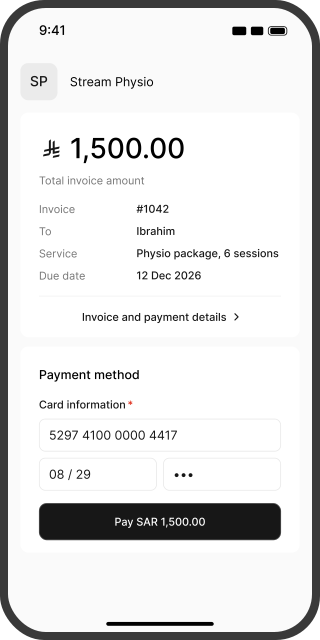
From payment link to payment confirmation
Three clear steps for your customer. No Stream account or app download required.
- 01
Open the link
Your customer opens the invoice or payment link and checks the service details and amount on your branded payment page.
 02
Pay with mada
They enter their card details and complete bank verification. With a compatible wallet such as Apple Pay, they confirm using the method available on their device.
- 03
See the result
Your customer receives confirmation, and the payment appears in your dashboard. Check its status without asking them for a receipt screenshot.
What does accepting mada cost?
On pay as you go, each payment includes a 1% gateway fee, SAR 1 for fraud management and Stream’s 0.8% service fee. There is no monthly subscription.
| Worked example: a SAR 1,500 invoice | Paid by Visa or Mastercard | Paid by mada |
|---|---|---|
| Gateway fee | SAR 41.25 (2.75%) | SAR 15.00 (1%) |
| Fraud management | SAR 1.00 | SAR 1.00 |
| Stream fee | SAR 12.00 (0.8%) | SAR 12.00 (0.8%) |
| You retain before VAT on fees | SAR 1,445.75 | SAR 1,472.00 |
Figures are for domestic cards and exclude VAT on fees where applicable. Fees and applicable VAT are deducted before the net amount is paid out. Full pricing and fees
Lower fees. The same price for your customer.
In this example, mada costs SAR 26.25 less before VAT on fees. Payment fees are yours to cover; do not add them to your customer’s bill for paying by card.
Track the payment through to your bank
Customer confirmation starts the processing stage. Once processing is complete, your funds are paid to your registered bank account according to the settlement schedule.
Your payouts
Settlements run on Sunday, Tuesday and Thursday when your balance exceeds SAR 100 after fees and payment processing is complete. Transfer can take up to 7 business days after settlement conditions are met. Your settlement report shows the payments, fees and net amount.
Customer refunds
Issue a refund from your dashboard when sufficient balance is available. It returns to the payment method used, usually reaching a mada card within 3 days of processing, depending on the bank. Gateway fees also apply to refunds.
How mada compares with other payment methods
mada is a useful choice for customers with local cards, with lower fees than domestic Visa and Mastercard at the rates shown. Offer other methods for customers who use different cards or wallets.
| Method | Who it suits | Gateway fees | Typical refund arrival |
|---|---|---|---|
| mada | Customers with mada-enabled cards | 1% + SAR 1 | Up to 3 days after processing |
| Domestic Visa and Mastercard | Customers using Visa or Mastercard | 2.75% + SAR 1 | 7 to 14 business days |
| Apple Pay | Customers with compatible Apple devices | Check wallet and card pricing | Depends on the card used |
| Samsung Pay | Customers with compatible Samsung devices | Check wallet and card pricing | Depends on the card used |
| International cards | Customers with cards issued outside Saudi Arabia, after activation | Card fee + an additional 1% | Depends on the card used |
Add Stream’s 0.8% and VAT on fees where applicable. Apple Pay and Samsung Pay are wallets that use added cards, rather than separate card types.
Start accepting mada with Stream
Stream brings invoices, payment links and payment tracking together, with Moyasar handling payment processing through the integration.
New to Stream?
- 1Create your Stream account.
- 2Complete your business details and upload the required documents. These include your commercial registration or freelance certificate, depending on your business type, and a matching bank account certificate. Add a website or social page showing your activity, prices and refund policy where applicable.
- 3Once approved, create your first invoice or payment link. Activation usually takes less than two business days after all required documents are submitted.
Already using Stream?
When creating a payment link, open “Manage payment methods” and check that mada is available. Then share the link with your customers.
Questions about accepting mada
Create a Stream account, complete verification and send an invoice or payment link. Your customer pays from the link. You do not need a payment terminal or online store for this workflow; a qualifying website or social page can support your activation application.
Yes. Stream accepts applications with a valid freelance certificate and a matching bank account certificate, alongside the owner’s details and other required information. Activation depends on document review and your business activity.
No. mada is a domestic payment network used for debit payments. A card may also carry a Visa or Mastercard logo for use on an international network. Check the payment method recorded for a transaction to understand its applicable fees.
No. On Stream’s pay-as-you-go plan, the 1% gateway fee is joined by SAR 1 for fraud management and Stream’s 0.8%. That totals 1.8% + SAR 1 per payment, before VAT on fees where applicable.
After payment processing is complete and settlement conditions are met. Settlements run on Sunday, Tuesday and Thursday for balances above SAR 100 after fees. Transfer can take up to 7 business days. Check your settlement report for each payout’s details.
Yes. Issue the refund from your dashboard when sufficient balance is available. It usually reaches the mada card within 3 days of processing, depending on the bank. Gateway fees apply to refunds.
Yes. Stream supports Apple Pay and Samsung Pay. Customers can use a compatible mada card added to their wallet when that wallet is available on their device and at checkout.
A one-off mada payment does not set up automatic billing. Recurring charges require a configured plan and a supported payment method. Confirm that the card is supported for your plan before relying on automatic renewals or installments.
Check the payment status in Stream before asking them to pay again. If it remains unclear, contact support with the transaction reference, amount and date. Do not share card details or verification codes.
Yes. Offer Visa, Mastercard or a supported wallet. Cards issued outside Saudi Arabia require international payments to be activated on your account first.