Accept Apple Pay on your invoices and payment links
Your customer already has a card in Apple Pay. Send a Stream invoice or payment link so they can choose that card and confirm on a compatible device, without entering its details again. Track the payment from your dashboard.
Stream charges 0.8%, plus payment processing fees and VAT on fees where applicable. Ask for Apple Pay pricing before activation. See pricing

From invoice link to payment confirmation
- Link to open the invoice and pay
- 1
- Link to open the invoice and pay
- Steps: review the invoice, choose a card, confirm payment
- 3
- Steps: review the invoice, choose a card, confirm payment
- Monthly subscription fees on the pay-as-you-go plan
- 0
- Monthly subscription fees on the pay-as-you-go plan
Payment processing and Stream fees apply to each payment under your pricing plan.
Apple Pay at a glance
Apple Pay is a digital wallet that uses a supported payment card. Choosing the wallet does not change the card issuer or make every card subject to the same conditions.
Payment methods available with Stream- Payment type
- Digital wallet using a card supported by its issuer
- Who can pay?
- Customers with an eligible card, device and browser
- Where it appears
- At checkout when available for the device and payment
- Card details
- Selected from the wallet instead of entered on the page
- Confirmation
- Device-dependent, such as Face ID, Touch ID or a passcode
- Collection channels
- Invoices and payment links
- Fees
- Stream's 0.8%, plus agreed processing fees
- Automatic renewals
- Confirm payment-method and card compatibility with the plan
- Payouts
- Sunday, Tuesday and Thursday, subject to settlement conditions
- Refunds
- Returned to the card used; timing depends on the issuer
Add Apple Pay to the way you collect
For a single session or an ongoing service, start with a clear invoice and offer a payment option your customer knows.
Send an invoice with the service and amount due. Your customer opens the link and chooses Apple Pay when available. You track the invoice status in Stream.
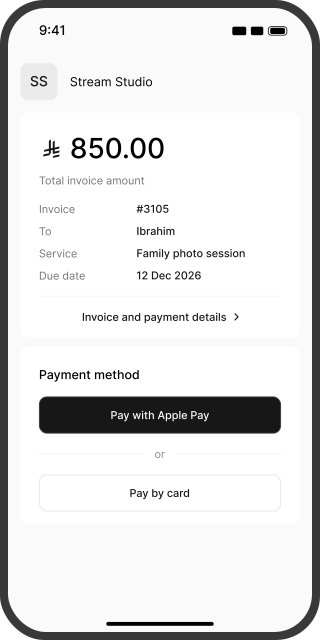
Review the invoice. Choose a card. Confirm payment.
Customers do not need a Stream account to pay. They need Apple Pay set up with a supported card and compatible device.
- 01
Open your link
The customer reviews your business name, the service and the amount before continuing to payment.
 02
Choose Apple Pay
They select Apple Pay and choose a card from their wallet. If a scan code appears on their computer, they continue on a compatible Apple device.
- 03
Confirm the payment
They complete the confirmation requested by their device. After a successful payment, they see confirmation and you can track the transaction in Stream.
Understand each part of the payment cost
Stream's pay-as-you-go fee is 0.8% of the payment amount. Processing fees apply separately. Ask for a breakdown for the card used through Apple Pay before you start collecting.
| Worked example: a SAR 1,500 payment | Amount in this example | What it means |
|---|---|---|
| Stream fee | SAR 12 (0.8%) | One part of the collection cost |
| Apple Pay processing | Your account and card-specific rate | Added to the Stream fee |
| VAT on fees | Added where applicable | Excluded from this example |
| Net receivable | SAR 1,500 less fees and applicable VAT | Calculated once all charges are known |
This illustrates the Stream fee only. For the total cost of Apple Pay, request a quote covering processing for the card used in the wallet and VAT where applicable. Request a pricing breakdown
Keep the price clear for your customer
Your business bears payment acceptance fees. Do not add a surcharge because the customer chooses Apple Pay. Set out the service price before sending the invoice.
Track the payment and the payout
Payment confirmation and arrival in your bank account are separate stages. Stream helps you follow each one.
Receiving your funds
Settlements run on Sunday, Tuesday and Thursday after processing is complete and your balance exceeds SAR 100 after fees. Transfer can take up to seven business days once conditions are met; some transactions may require additional review.
Refunding your customer
Request a full or partial refund from the invoice when sufficient balance is available. Funds return to the card used in Apple Pay, with posting time determined by the issuer. Your business bears processing fees; check the applicable charges before submitting the refund.
A wallet or a card, as your customer prefers
| Payment option | Customer experience | What to check |
|---|---|---|
| Apple Pay | Choose a wallet card and confirm on a device | Device and card eligibility; processing fees |
| Samsung Pay | Use a wallet on a compatible device | Checkout availability and the card used |
| mada | Pay through the Saudi card network | Card eligibility for online payment |
| Visa | Pay with a card supported by the service | Card eligibility and applicable fees |
| Mastercard | Pay with a card supported by the service | Card eligibility and applicable fees |
Apple Pay and Samsung Pay are wallets that use cards. mada, Visa and Mastercard are card networks. A wallet and a network can be part of the same payment.
Start accepting Apple Pay with Stream
New to Stream?
Create your account and submit your business details and required documents. Once approved, create an invoice or payment link and review the payment options available. Account activation usually takes less than two business days after all documents are submitted.
Already using Stream?
Review payment methods in your invoice and payment-link settings. Check that Apple Pay appears on a compatible checkout device, and ask for pricing or activation help when needed.
Questions about accepting Apple Pay
You can collect through a Stream invoice or payment link without building a complete store. Your business account still needs activation and the required documents.
No. They open the payment page from your link. Apple Pay requires a wallet set up with an issuer-supported card, a compatible device and browser.
Stream and payment processing fees apply. Apple not charging the customer a usage fee does not make payment acceptance free for your business.
Ask for the wallet and card-specific pricing on your account. The card logo alone is not enough to calculate the total fee.
Check device and browser compatibility, wallet setup, an eligible card and checkout availability. If the issue continues, the customer can use another available method and contact support.
It depends on the browser and device. When an Apple Pay code appears on the computer, the customer can scan it with an iPhone and continue on a compatible device. This option still depends on checkout and device compatibility.
A one-time payment does not establish automatic renewal. Confirm payment-method and card support for the subscription plan before offering it to your customer.
Stream organizes the collection plan your business offers; it does not lend to the customer. Confirm that the collection method for later payments is compatible with the plan.
To the card the customer used in Apple Pay. Its wallet card number may differ from the physical card number. Posting time depends on the issuer.
Check the transaction status before asking the customer to pay again. If needed, give support the invoice reference, amount and attempt time. Do not ask the customer to share a verification code or full card details.
Explore other ways to collect
mada
Collect through Saudi Arabia's domestic card network
Visa and Mastercard
Offer payment with supported cards
Samsung Pay
A wallet option for compatible devices
Payment methods
Choose the right mix for your collection workflow