Get paid on time, without chasing customers
Stream is billing and payment collection software for small businesses in Saudi Arabia. Send invoices, payment links and subscriptions by WhatsApp, SMS or email, let customers pay by mada, Visa, Mastercard, Apple Pay or Samsung Pay, and let Stream follow up until they do. No monthly fee: you pay only on successful payments.

Customers pay with
mada, Visa, Mastercard, Apple Pay, Samsung Pay

Pricing
0.8% per payment plus gateway fees, no monthly fee

Settlements
To your bank every Sunday, Tuesday and Thursday

Setup
About 2 business days once your documents are approved
Why small businesses wait to get paid
Many small businesses in the Kingdom still bill from Word or Excel, share an IBAN on WhatsApp, and keep track of who owes what in their head.
| Topic | Today | |
|---|---|---|
| Sending the bill | A PDF or a photo of the invoice on WhatsApp | A branded invoice with a pay button, by WhatsApp, SMS or email |
| Getting paid | The customer transfers to your IBAN and you check the bank app | The customer pays by mada, Visa, Mastercard, Apple Pay or Samsung Pay, and the payment lands on the right invoice |
| Following up | You message each customer yourself, which can strain the customer relationship | Reminders go out automatically before and after the due date |
| Knowing where you stand | You add up who owes what at the end of the month | Paid, outstanding and overdue amounts update as customers pay |
How billing works with Stream
- 01
Add your customer and product
Once. Then reuse them on every invoice, link and subscription.
 02
Send the bill
An invoice, a payment link or a subscription, by WhatsApp, SMS or email, with your logo, in Arabic or English.
- 03
Your customer pays from their phone
With mada, Visa, Mastercard, Apple Pay or Samsung Pay. No app to download, no account to create.
- 04
The money settles to your bank
Every Sunday, Tuesday and Thursday, with a report of each payment and fee.
See exactly what your customers receive
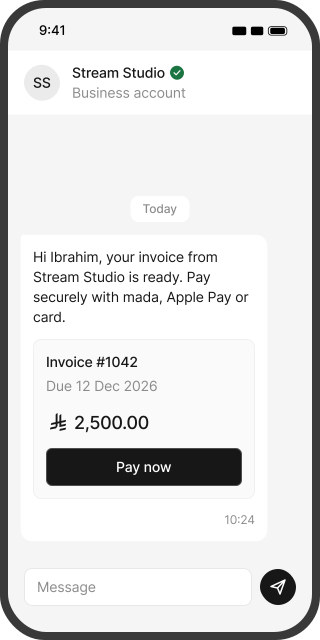
Four screens, the same on every phone. No app to download.
Your business name, the amount and the link to pay.
One account for every way you charge
Whether you bill once, every month or in parts, set it up the way your customers actually pay.
Invoices
For a job, a project or an order, with your logo and VAT.
Payment links
One link for many customers, shared on WhatsApp, Instagram or your website.
Subscriptions
Monthly or yearly plans charged to the customer's card automatically.
Installments
Let customers split a bigger bill into 2, 3 or 4 payments you control.
Deposits
Take a first payment now and the rest on a date you choose.
Bulk invoices
Send invoices to many customers at once from one file.
Coupons
Fixed or percentage discounts on any product.
Refunds
Refund from your dashboard, under your own refund policy.
You don't need a website to take payments. To activate your account, a website or a social media page for your business is enough.
Take payments without a website or a developer
A payment gateway on its own has to be connected to a website or an app, and that usually takes a developer. With Stream you create invoices and payment links from your dashboard and send them by WhatsApp, SMS or email, the same day your account is live. When you are ready to automate more, the REST API and webhooks are there.
How payment links workInvoicing software, a payment gateway, or Stream?
| Topic | E-invoicing or accounting software | A payment gateway | |
|---|---|---|---|
| Main job | Issues tax invoices, keeps your books and prepares VAT returns | Processes card payments on a website or app | Bills customers and collects the money |
| Follows up on unpaid bills | Not its main job | Not its main job | Yes, automatically, until the bill is paid |
| How it works with Stream | Stream sends paid invoices to it | Stream works through a licensed gateway partner for you | The layer between your customers and your books |
You don't have to replace anything. Keep your accounting software, and connect Stream to Odoo, Qoyod, Zoho, Daftra or Wafeq.
Reminders that follow up for you, politely
Asking a customer for money is awkward, especially when you know them well. Stream sends the reminder for you, with the amount, the due date and the link to pay, by WhatsApp, SMS or email.
 Before the due date
A reminder with the amount, the due date and the link to pay.
 After the due date
Automatic follow-ups until the invoice is paid.
- If a card payment fails
For installments and subscriptions, Stream keeps retrying the saved card.
 Overdue alert to you
You get an email when an invoice passes the number of overdue days you choose.
Know who owes you, at a glance
One dashboard for every invoice, link and subscription, so you always know your cash position.
- Dashboard: invoiced, paid, outstanding and settled amounts for any period.
- Overdue list: who owes what, and for how many days.
- Settlement reports: every payment, fee and net amount on each settlement day.
- Team access: invite your team with admin or user roles, and add branches as you grow.
- Refund policy: your own policy on every invoice, accepted by customers before they pay.
- Accounting: connect Odoo, Qoyod, Zoho, Daftra or Wafeq.
- Security: card data is handled by our PCI DSS compliant gateway partner, and data is stored in Saudi and regional data centers.
VAT and e-invoicing for small businesses
Stream invoices carry your logo, come in Arabic and English, and show 15% VAT when you are VAT-registered. They follow Saudi requirements and can connect directly to ZATCA and to your accounting software. Not registered yet? VAT registration becomes mandatory once your taxable sales pass SAR 375,000 in 12 months, and you can register voluntarily from SAR 187,500.
Works with the tools you already use
Share Stream links wherever your customers talk to you, and send every payment to your accounting software. If you have a website or an app, developers can connect Stream through the REST API and webhooks.
What Stream costs a small business
You pay a Stream service fee and the payment gateway's fee, only on successful payments. On the pay-as-you-go plan there is no monthly subscription.
| Stream service fee | 0.8% |
|---|---|
| mada gateway fee | 1% |
| Visa and Mastercard gateway fee | 2.75% |
| Fraud management | SAR 1 per payment |
Gateway and fraud management fees also apply to refunds. Setup fees may apply for some business types. Fees are shown before VAT. Billing more than SAR 12 million a year? Talk to sales about enterprise pricing.
Example: a SAR 2,500 invoice. You receive:
Built for small businesses that bill customers
Agencies and consultants
Project invoices, retainers and deposits.
Freelancers
Invoices and payment links under your freelance document.
Trainers and academies
Course fees, sessions and installment plans.
Salons, studios and clinics
Deposits, packages and memberships.
Home and maintenance services
Visit invoices and monthly service plans.
Small business billing: common questions
No. On the pay-as-you-go plan you pay a 0.8% Stream fee and the gateway fee on each successful payment, and nothing in a month with no payments. Setup fees may apply for some business types.
No. Send invoices and payment links by WhatsApp, SMS or email. To activate your account, you need a website or a social media page for your business.
Yes, with a freelance document. Stream accepts a commercial registration or a freelance document, with a matching bank account certificate.
No. Stream is billing and collection software. Payments are processed by our payment gateway partner, licensed by the Saudi Central Bank, and settled to your bank account. You don't need a gateway contract of your own.
mada, Visa, Mastercard, Apple Pay and Samsung Pay. Cards issued outside Saudi Arabia work once international payments are activated (within 7 business days of approval), with an extra 1% gateway fee.
Yes. Create a subscription and the customer's card is charged on each billing date, with a receipt every time. If a payment fails, Stream retries the card and reminds the customer.
Yes. Allow 2, 3 or 4 installments on an invoice or payment link, or set your own plan with a first payment now. Each installment is charged to the customer's card on its date. Stream does not lend money.
No. Keep it for your books and VAT returns. Stream bills and collects, and sends payments to Odoo, Qoyod, Zoho, Daftra or Wafeq.
Stream invoices follow Saudi requirements, carry your branding and can connect directly to ZATCA and to your accounting software.
mada debit payments usually clear in about 1 business day, and mada credit, Visa and Mastercard in about 2 to 3 (7 at most). Settlements go to your bank every Sunday, Tuesday and Thursday once your balance after fees is at least SAR 100.
About 2 business days once your documents are approved: a commercial registration or freelance document, a matching bank account certificate, and a website or social media page. Our team trains you for free.
Add team members with roles, add branches, and connect your systems through the API. If you bill more than SAR 12 million a year, talk to sales about enterprise pricing.