Accept American Express on your invoices and links
Send a Stream invoice or payment link and let your customer pay with an American Express card once acceptance is enabled on your account. Track the invoice and payment alongside your other business collections.
Stream charges 0.8%, plus American Express processing fees and VAT on fees where applicable. Ask about pricing and activation for your account. See pricing
Four digits on the front of the card
Another customer choice. One place to track collections.
- Invoice link for your customer to complete payment
- 1
- Invoice link for your customer to complete payment
- Steps: review the invoice, enter the card, confirm payment
- 3
- Steps: review the invoice, enter the card, confirm payment
- Monthly subscription fees on the pay-as-you-go plan
- 0
- Monthly subscription fees on the pay-as-you-go plan
Stream and processing fees apply under your account pricing. American Express acceptance must be enabled.
American Express acceptance at a glance
American Express, also known as Amex, is a separately enabled card option for your business. Once it is available for your collection channel, the customer uses the regular card-payment form.
Payment methods in Stream- Payment method
- Eligible American Express cards
- Acceptance requirement
- Enable American Express for the account and collection channel
- Collection channels
- Invoices and payment links
- Card entry
- Cardholder name, number, expiry and security code
- Card number
- Usually 15 digits on American Express cards
- Security code
- Four digits on the front of the card
- Confirmation
- Authentication as required for the transaction
- Fees
- Stream's 0.8%, plus American Express processing fees
- Payouts
- Stream's schedule and processing/balance conditions apply
- Refunds
- To the original payment method; timing depends on the issuer
Add Amex to the ways your customers can pay
Choose the collection workflow that fits your service, and check American Express acceptance before sharing the link.
Send an invoice with the service and amount due. The customer enters their card at checkout, and the payment appears against the invoice after a successful transaction.
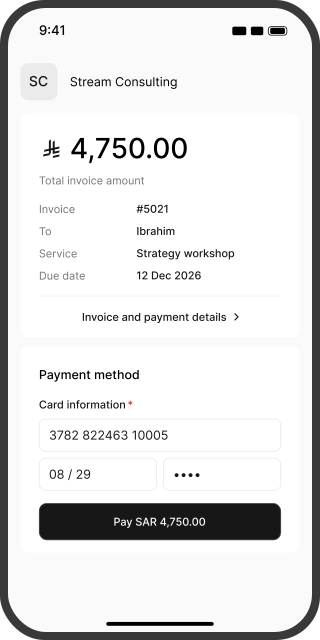
The same invoice link, with the option to use Amex
Customers do not need a Stream account to complete a card payment.
- 01
Review the details
The customer opens your link and checks the business name, service and amount due.
 02
Enter the American Express card
They enter their cardholder name, card number, expiry and four-digit security code, then complete any required authentication.
- 03
Track the payment
After a successful transaction, the customer sees confirmation and you see the payment linked to its invoice in Stream.
Understand Amex pricing before activation
Stream's pay-as-you-go fee is 0.8%. American Express processing fees apply separately under your agreed account pricing.
| Worked example: a SAR 1,500 payment | Amount in this example | Detail |
|---|---|---|
| Stream fee | SAR 12 (0.8%) | One part of the total collection cost |
| American Express processing | Your agreed account quote | Added to the Stream fee |
| VAT on fees | Added where applicable | Excluded from this example |
| Net receivable | SAR 1,500 less fees and applicable VAT | Calculated once all charges are known |
This illustrates the Stream fee only. Request a quote showing the American Express processing rate, any fixed charges and VAT where applicable. Request a pricing breakdown
A clear price, whichever card the customer chooses
Your business bears card acceptance fees. Do not add a surcharge because a customer chooses American Express. Make the service price clear before payment.
From successful payment to settled funds
Transaction confirmation means the payment succeeded. The bank transfer follows processing and settlement.
Receiving your funds
Settlements run on Sunday, Tuesday and Thursday after processing is complete and your balance exceeds SAR 100 after fees. Transfer can take up to seven business days once conditions are met; some transactions may require additional review.
Refunding your customer
Request a full or partial refund from the invoice when sufficient balance is available. Funds return to the original payment method, with posting time determined by the issuer. Check refund charges before submitting; your business remains responsible for processing fees.
Choose the payment methods your customers need
| Payment method | Customer choice | What to review |
|---|---|---|
| American Express | Use an eligible Amex card | Acceptance activation and fees |
| Visa and Mastercard | Use an eligible card from either network | Card type and acceptance conditions |
| mada | Use the domestic card network | Online-payment eligibility |
| Apple Pay | Use a card in Apple's wallet | Wallet, card and device compatibility |
| Samsung Pay | Use a card in Samsung Wallet | Wallet, card and device compatibility |
Enabling one card type does not enable every other type. A digital wallet uses a card that remains subject to its acceptance conditions.
Set up your account to accept American Express
New to Stream?
Create your account and complete the required business documents. Ask about American Express eligibility and fees, then offer it on invoices and payment links after approval and activation.
Already using Stream?
Open Payment methods in Settings, choose Invoices or Payment links, and review AMEX. Check that it is enabled for the collection channel you intend to use, then open a new link to verify the payment experience.
Questions about accepting American Express
Yes. Review AMEX in your payment settings and confirm availability for your account and the invoices or links you use. Enabling Visa and Mastercard does not automatically enable American Express.
The customer does not need a separate button. Once acceptance is enabled, they enter their American Express card in the card-payment form.
You can collect through a Stream invoice or link after activating your account and the payment method. You do not need to build a complete store, but your business must meet its onboarding requirements.
American Express cards usually have a four-digit security code on the front. The customer enters the requested code at checkout; they should not send it to the merchant or support team.
Request American Express pricing for your account. Do not use another network's rate to estimate the cost. Agreed processing fees are added to Stream's 0.8% and VAT where applicable.
Acceptance depends on the card, issuer and enabled service conditions. Enabling the card type does not guarantee every transaction or every card issued in every country.
For automatic renewal, confirm that the card and acceptance route support recurring payments under your plan. Eligible cards can be used for an individual invoice once acceptance is enabled.
Authentication depends on the card and transaction. The customer follows the instructions shown and may need to complete additional verification before payment.
Check that American Express is enabled and review the transaction status first. The customer can then check their card details or contact the issuer. Offer another method when needed; do not request a verification code or full card details.
Your business payouts follow Stream's settlement schedule and conditions. Customer refund posting depends on the issuer after processing. These are separate timelines.