Collect school fees on time, without chasing parents
Stream is a comprehensive billing solution for private and international schools in Saudi Arabia. Send every fee by WhatsApp, SMS or email, let parents pay in full or in installments you set, and see who has paid in real time, beside the school system you already use.

Parents pay with
mada, Visa, Mastercard, Apple Pay, Samsung Pay

Settlements
To your bank every Sunday, Tuesday and Thursday

Invoices
Arabic and English, with your school's logo

Scale
From nurseries with 40 children to schools with 5,000+ students
Why school fees arrive late, and who ends up chasing them
For many schools in the Kingdom, fee collection still runs on bank transfers, WhatsApp screenshots and a spreadsheet of who promised to pay when.
| Topic | Today | |
|---|---|---|
| Paying | Parents transfer by IBAN and send a screenshot to the school WhatsApp | Parents pay from a link, and each payment lands on the right invoice, so there is nothing to reconcile by hand |
| Following up | Your team chases families one by one, by phone and message | Reminders go out automatically before and after each due date |
| Receipts and plans | Receipts take days, and installment promises live in a spreadsheet | Parents get an instant receipt and see every upcoming installment |
| Overdue fees | You find out who is overdue at the end of the month | The overdue list shows who owes what, and for how many days, today |
How school fee collection works with Stream
- 01
Load your fee list
Import every family and fee from one CSV file, or create invoices, subscriptions and payment links one at a time.
 02
Parents get the bill on their phone
By WhatsApp, SMS or email, in Arabic or English. The invoice they open carries your school's logo and colors.
- 03
They pay in full or in installments
With mada, Visa, Mastercard, Apple Pay or Samsung Pay. No app to download, no account to create.
- 04
You see it, and the money settles
Paid, outstanding and overdue balances update as parents pay. Funds settle to your bank every Sunday, Tuesday and Thursday.
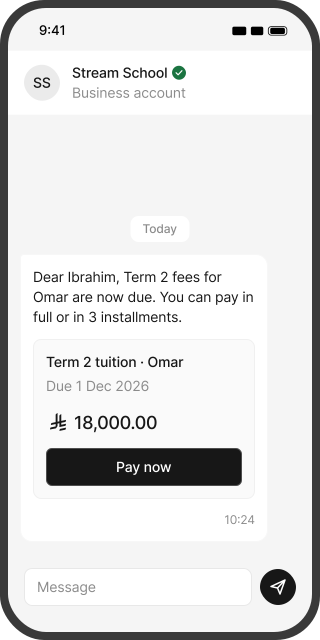
See exactly what parents receive
Four screens, the same on every phone. No app to download.
The bill arrives where parents already are.
Every school fee, in one place
Tuition is only part of the year. Set up each fee the way it is actually paid.
Registration and re-enrolment
A payment link with a registration form and a seat limit, open before the school year starts.
Tuition by term or by month
An invoice per term, or a subscription that bills each month automatically.
Installment plans
2, 3 or 4 payments by default, or your own plan: a deposit now and the rest from a date you choose.
Bus and transport
Its own fee line or a monthly subscription, never mixed into tuition.
Books, uniforms and meals
One-off invoices, or a payment link per grade.
Trips, activities and summer programs
A payment link per event, with a sign-up form and a seat limit.
Families with several children
One invoice for the family, with a line for each child. The parent pays once and gets one receipt.
Discounts and scholarships
Sibling, staff, early-payment and scholarship discounts, as fixed or percentage coupons on the right fee.
Under the Ministry of Education's fee rules, uniforms and transport are not part of registered tuition, so bill them as separate lines.
Installment plans your school runs, not a lender
Most families would rather spread tuition across the year. With Stream the plan is yours: you decide which fees can be split, into how many payments, and whether a deposit comes first. The parent picks a plan at checkout. The first payment is charged straight away, and the rest are charged to the same card on their due dates. If some families need a longer plan, give them their own plan while everyone else keeps your default. Parents see every upcoming payment in their customer portal, and you see every plan on your dashboard.
How school fee installments workIn-house installments or education financing?
| Topic | Education financing providers | |
|---|---|---|
| Who sets the plan | The financing company | Your school |
| When the school is paid | Upfront, by the provider, under its terms | As each installment is paid |
| Parent eligibility | Checks set by the provider, such as salary and employment | Any parent with a supported card |
| Who the parent pays | The financing company | Your school |
| If a payment is missed | The provider collects from the parent and carries the risk | Stream keeps retrying the saved card, reminds the parent and alerts your team |
| Cost to the school | Set by the provider | Stream and gateway fees per payment |
You don't have to choose. Make in-house plans your default, and keep financing as an option for families who need longer terms.
Reminders that stay polite, so your team doesn't have to chase
Stream reminds parents automatically, with the amount, the due date and the link to pay, by WhatsApp, SMS or email. Reminders go to the payer on the invoice, so they reach the parent or guardian, not the student.
 Before the due date
A reminder with the amount, the due date and the link to pay.
 After the due date
Automatic follow-ups until the fee is paid.
- If a card payment fails
For installments and subscriptions, Stream keeps retrying the saved card.
 Overdue alert to you
Your finance team is emailed when an invoice passes the number of overdue days you choose.
Every fee, paid and overdue, in one view
School fee management without another system to learn. See who has paid and who hasn't at a glance, and send the data to your accounting software.
- Dashboard: invoiced, paid, outstanding and settled amounts for any period.
- Overdue list: who owes what, and for how many days.
- Settlement reports: every payment, fee and net amount on each settlement day.
- Multi-campus school groups: a branch per campus, with organization admin, branch admin and branch user roles.
- Refund policy: your own policy on every invoice, accepted by parents before they pay.
- Accounting: connect Odoo, Qoyod, Zoho, Daftra or Wafeq.
- Security: card data is handled by our PCI DSS compliant gateway partner, and data is stored in Saudi and regional data centers.
VAT and ZATCA for school fees
Saudi schools bill two VAT treatments on one fee list. For Saudi citizens at Ministry-accredited private and international schools, the state bears the VAT on tuition and textbooks, and the tax invoice must carry the citizen's national ID number and contact details. Other students pay 15% VAT. Stream invoices are branded and bilingual, and they connect to your accounting software.
Works beside Noor and your school management system
Stream doesn't replace your school management system, Noor or your accounting software. Your school system stays the record of students and grades. Stream handles the money: bills, reminders, payments and settlement. Bring families in with a CSV file or through the API, and send payments to your accounting software.
What Stream costs a school
You pay a Stream service fee and the payment gateway's fee, only on successful payments. On the pay-as-you-go plan there is no monthly subscription.
| Stream service fee | 0.8% |
|---|---|
| mada gateway fee | 1% |
| Visa and Mastercard gateway fee | 2.75% |
| Fraud management | SAR 1 per payment |
Gateway and fraud management fees also apply to refunds. Setup fees may apply for some business types. Fees are shown before VAT.
The median national-curriculum grade fee in the Ministry of Education's 1446 AH (2024/25) fee list is SAR 20,000. Your school receives:
“My experience with Stream has been excellent. The process is simple and smooth, and the services provided encourage parents to complete their payments, making the entire experience comfortable and efficient.”
Built for every kind of school
International schools
Termly invoices in Arabic or English, and cards issued abroad once international payments are activated.
National private schools
Tuition, transport and books on one fee list, with sibling discounts.
Nurseries and kindergartens
Monthly fees as subscriptions.
Sports and after-school academies
Seasons, sessions and sign-up forms.
Training and tutoring centers
Course fees and installment plans.
School fee collection: common questions
No. Keep your school system and Noor as the record of students. Stream handles fees and payments beside them. Load families by CSV or API, and send payments to your accounting software.
Yes. You decide which fees can be split, into how many payments, and whether a deposit comes first. Parents choose a plan at checkout, and each installment is charged to their card on its due date. Stream is not a lender, so there is no financing contract for the parent to sign.
No. Stream is billing and collection software. Payments are processed by our payment gateway partner, licensed by the Saudi Central Bank, and settled to your school's bank account. You don't need a gateway contract of your own to start.
mada, Visa, Mastercard, Apple Pay and Samsung Pay. Cards issued outside Saudi Arabia work once international payments are activated (within 7 business days of approval), with an extra 1% gateway fee.
Not through Stream. Parents pay from the Stream link with mada, Visa, Mastercard, Apple Pay or Samsung Pay. If your school already has a SADAD channel, you can keep it for families who prefer it.
Not if the invoice is in the parent's name. Reminders go to the payer on the invoice, by WhatsApp, SMS or email, so use the parent's or guardian's number.
Yes. Add the company as its own customer and send the invoice to its finance contact. Note that the state bears the VAT for Saudi students only when the citizen pays, so an invoice paid by a company carries 15% VAT. If two parents share the fees, send each parent an invoice for their part.
For Saudi citizens at Ministry-accredited private and international schools, the state bears the VAT on tuition and textbooks, and the invoice must show the citizen's national ID number and contact details. Other students pay 15% VAT.
Yes, if the school is registered for VAT. Its tax invoices follow ZATCA's e-invoicing (Fatoora) rules, including invoices for Saudi students where the state bears the VAT. Stream issues bilingual, branded invoices and connects to your accounting software. Ask our team how Stream fits your current e-invoicing setup.
mada debit payments usually clear in about 1 business day, and mada credit, Visa and Mastercard in about 2 to 3 (7 at most). Settlements go to your bank every Sunday, Tuesday and Thursday once your balance after fees is at least SAR 100.
Yes. Create a payment link with a registration form and a limit on the number of seats, and share it by WhatsApp or on your website. You can also take a deposit now and schedule the remaining installments from the start of term.
Refunds follow your school's own refund policy, which parents accept before paying. You issue the refund from your dashboard. It reaches mada cards within 24 hours to 3 days, and Visa or Mastercard within 7 to 14 working days.
About 2 business days once your documents are approved. Schools need their commercial registration, a matching bank account certificate and their school license, and our team trains your staff for free.