Accept Visa and Mastercard by invoice or payment link
Send an invoice or payment link by WhatsApp or email. Your customer pays by card, and you track invoices and payments in Stream. For ongoing services, set up subscriptions and scheduled installments.
3.55% + SAR 1 per Visa or Mastercard payment with a Saudi-issued card, before VAT on fees where applicable. No monthly subscription on pay as you go. See pricing
Two card networks. One payment experience.
- Card networks: Visa and Mastercard
- 2
- Card networks: Visa and Mastercard
- Payment link you can share with multiple customers
- 1
- Payment link you can share with multiple customers
- Monthly subscription fees on pay as you go
- 0
- Monthly subscription fees on pay as you go
Payment fees apply under the pricing plan.
Card acceptance at a glance
Visa and Mastercard are payment networks, not a single type of card. A card can be credit or debit; its issuing bank determines its features and authentication requirements.
Payment methods available on Stream- Card networks
- Visa and Mastercard
- Card types
- Credit and debit cards supported by the service
- Issuing country
- Saudi-issued cards; foreign-issued cards after approval
- Authentication
- Bank verification depending on the card and transaction
- Collection options
- Invoices, payment links, subscriptions and installments
- Supported wallets
- Apple Pay and Samsung Pay with a compatible card and device
- Domestic card fees
- 2.75% + SAR 1 for the gateway, plus Stream’s 0.8%
- Settlement days
- Sunday, Tuesday and Thursday
- Settlement threshold
- More than SAR 100 after fees, with payment processing complete
- Refund arrival
- Usually 7 to 14 business days after processing, depending on the bank
From one-off invoices to monthly payments
Choose how to bill for your service and let customers pay by card. Automatic charges require a configured plan and a card that supports recurring payments.
Send a clear bill with the service, amount and due date. Your customer pays from the link, and you check the payment status in your dashboard instead of asking for a bank-transfer screenshot.
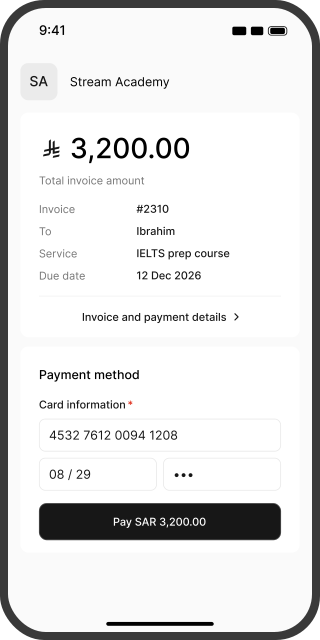
Open the link. Pay by card. See the confirmation.
Your customer does not need a Stream account or an app download to pay.
- 01
Review the invoice
They open the link and check your business name, the service and the amount. If you offer installments, they choose their payment option before paying.
 02
Pay with a card
They enter their Visa or Mastercard details, or use a supported wallet. They then complete any verification required by their bank, such as a code or approval in the bank’s app.
- 03
Track the result
Your customer receives confirmation, and the payment appears in Stream. You can track received and upcoming payments in your dashboard.
Know the fees before you collect
Domestic card payments on pay as you go carry a 2.75% gateway fee, SAR 1 for fraud management and Stream’s 0.8% fee. Foreign-issued cards carry an additional one percentage point after international payments are activated.
| Worked example: a SAR 1,500 Visa or Mastercard payment | Card issued in Saudi Arabia | Card issued outside Saudi Arabia |
|---|---|---|
| Gateway fee | SAR 41.25 (2.75%) | SAR 56.25 (3.75%) |
| Fraud management | SAR 1.00 | SAR 1.00 |
| Stream fee | SAR 12.00 (0.8%) | SAR 12.00 (0.8%) |
| You retain before VAT on fees | SAR 1,445.75 | SAR 1,430.75 |
This example uses standard rates and excludes VAT on fees where applicable. Foreign-card acceptance requires approval. Your customer’s bank may charge its own currency-conversion fees. View pricing and fees
Keep the price clear for your customer
Payment-acceptance fees are yours to cover. Do not add a surcharge because your customer chooses Visa or Mastercard. For subscriptions and installments, fees apply to each payment separately.
From a successful payment to your bank account
A successful transaction confirms the payment. The money reaches your bank account after processing and settlement.
Your payouts
Settlements run on Sunday, Tuesday and Thursday after payment processing is complete and your balance exceeds SAR 100 after fees. Transfer can take up to 7 business days after the conditions are met, unless further review is needed. The settlement report shows payments, fees and net amounts.
Customer refunds
Issue a refund from your dashboard when sufficient balance is available. It returns to the payment method used, usually arriving within 7 to 14 business days, depending on the bank. Gateway fees also apply to refunds.
Let customers choose their card or wallet
Visa and Mastercard give customers more options alongside mada and wallets. Fees and requirements vary by payment method and the card’s issuing country.
| Method | Who it suits | Gateway fees | What to know |
|---|---|---|---|
| Domestic Visa and Mastercard | Customers with Saudi-issued cards | 2.75% + SAR 1 | One-off payments and recurring plans with an eligible card |
| International Visa and Mastercard | Customers with foreign-issued cards | 3.75% + SAR 1 | International payments must be activated |
| mada | Customers with cards supporting the local network | 1% + SAR 1 | A separate payment route, even if one card carries both logos |
| Apple Pay | Customers with compatible Apple devices | Check wallet and card pricing | A wallet using an added card |
| Samsung Pay | Customers with compatible Samsung devices | Check wallet and card pricing | Requires a compatible card and device |
Add Stream’s 0.8% and VAT on fees where applicable. Domestic and international refer to where the card was issued, not the customer’s nationality.
Start accepting Visa and Mastercard with Stream
Stream manages invoices, payment links and collection plans, with Moyasar processing payments through the integration.
New to Stream?
- 1Create your account and complete your business details.
- 2Provide the documents required for your business type, including your commercial registration or freelance certificate and a matching bank account certificate. Add a website or social page that meets the business-information requirements.
- 3Once approved, create an invoice or payment link and enable card payments. Activation usually takes less than two business days after all required documents are submitted.
Already using Stream?
Open “Manage payment methods” when creating a payment link and check that Visa and Mastercard are available. Apply for international payments first if you want to accept cards issued outside Saudi Arabia.
Questions about accepting Visa and Mastercard
You do not need a full online store or payment terminal to collect through Stream links. Once your account is activated, send an invoice or payment link. A social page can support your application if it meets the business-information requirements.
No. They are payment networks used by credit and debit cards. Eligibility for online or recurring payments depends on the card type, its issuing bank and the enabled service.
No. International payments require a separate application with successful transaction records, an invoice, proof of delivery and the required documents. Approval is subject to review. Accepted international payments carry an additional one-percentage-point fee.
Standard pay-as-you-go rates total 3.55% + SAR 1 for a domestic card payment, including gateway and Stream fees. After international activation, foreign-issued cards total 4.55% + SAR 1. Both figures are before VAT on fees where applicable.
Yes, after configuring the plan and completing the first payment with an eligible recurring-payment card. Customers can cancel renewal from their profile; cancellation does not automatically refund past payments. A payment can still fail if the card is declined or funds are insufficient.
No. You offer the payment plan, and each installment is collected on its scheduled date. Stream manages collection; it does not lend to your customer or pay you the full plan value upfront.
Yes, with a compatible card added to Apple Pay and the wallet available on their device and at checkout. Stream also supports Samsung Pay. Check wallet pricing rather than assuming every payment route has the same fee.
After processing and settlement conditions are met. Payouts run on Sunday, Tuesday and Thursday for balances above SAR 100 after fees. Transfer can take up to 7 business days, subject to any further review required.
Usually 7 to 14 business days after the refund is processed, depending on the bank. This is separate from your merchant payout schedule. A sufficient balance is required to issue the refund, and gateway fees apply.
Check the transaction status before requesting another payment. Confirm that online payments and, where needed, international cards are enabled. If the status remains unclear, contact support with the reference, amount and date, without sharing card details or verification codes.