Take sign-ups and payments for your event with one link
Stream gives event, trip and venue organisers in Saudi Arabia one payment link for registration and fees. Add your questions, set a seat limit, share it on WhatsApp or Instagram, and let people pay by mada, Visa, Mastercard, Apple Pay or Samsung Pay. Every payment arrives with the sign-up it belongs to, so you always know who is coming and who has paid.
Customers

Attendees pay with
mada, Visa, Mastercard, Apple Pay, Samsung Pay

Seat limits
Close the link after a number of payments or on a date

Pricing
0.8% per payment plus gateway fees, no monthly fee

Settlements
To your bank every Sunday, Tuesday and Thursday
Why event payments turn into a spreadsheet the night before
Most events in the Kingdom still run on a sign-up form, an IBAN in the group chat and a list of people who promised to transfer tomorrow. The night before, someone sits matching transfers to names.
| Topic | Today | |
|---|---|---|
| Signing up | A Google Form or Jotform, then an IBAN sent separately | One link with your questions and the payment together |
| Checking who paid | Transfers matched to names in a spreadsheet by hand | Each payment arrives with the registration it belongs to |
| Seats | You count sign-ups and close the form yourself | The link closes after the number of payments you set, or on its expiry date |
| Deposits and balances | Deposits and "I'll transfer the rest later" tracked in chats | A deposit now and an invoice for the balance, with automatic reminders |
How event registration payments work with Stream
- 01
Create your link
Add your fees as products, with quantities, a coupon, a maximum number of payments or an expiry date.
 02
Add your questions
Attach a registration form for the details you need: names, phone numbers, sizes or dietary needs.
- 03
Share it
On WhatsApp, Instagram, email or your website, in Arabic or English, with your logo.
- 04
See who paid
Registrations and payments update together, and the money settles to your bank every Sunday, Tuesday and Thursday.
See exactly what attendees receive
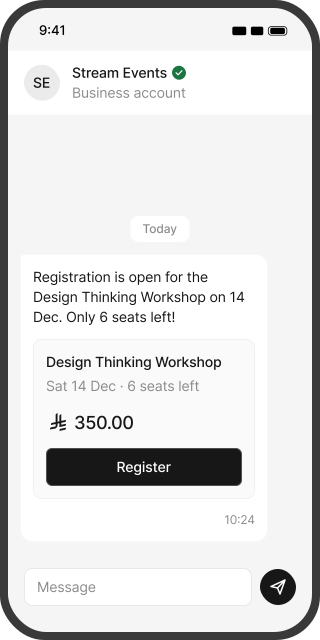
Four screens, the same on every phone. No app to download, no account to create.
Your event, the fee and the seats left, in WhatsApp or Instagram.
One link for every kind of event, trip and booking
From a 20-seat workshop to a wedding hall booked a year ahead.
Workshops and courses
A seat limit, a registration form and early-bird pricing.
Conferences and business events
Delegate fees, company invoices and group bookings.
Runs and tournaments
Registration with sizes and categories, closed when places run out.
Group trips and outings
Every traveller pays through the same link, deposit first and the rest before departure.
Summer and holiday camps
Weekly or full-season fees with the child's details in the form.
Halls, chalets and istirahas
A booking deposit to hold the date, and the balance before the event.
Event and wedding planners
A deposit, milestone payments and the final balance from one client.
Early-bird and group discounts
Fixed or percentage coupons on any fee.
Stream is not a ticketing system. There are no seat maps or ticket scanning: Stream takes the registration and the money.
Know who registered and who paid, without a spreadsheet
Every payment arrives with the answers the attendee gave, so your list of who is coming is also your list of who has paid. See how many places are left, who paid in full and who still owes a balance. When you reach your limit, the link closes on its own. Export the list for check-in or catering, or send it to your event platform.
How to create a payment linkA form and a bank transfer, a ticketing platform, or Stream?
| Topic | A form and a bank transfer | A ticketing platform | |
|---|---|---|---|
| What attendees do | Fill a form, then transfer and send a screenshot | Buy a ticket on the platform's page | Fill your questions and pay in one link |
| Seat maps and ticket scanning | No | Yes | No |
| Deposits and balances for private bookings | Tracked by hand | Rarely | Yes, deposit now and balance by invoice |
| When you get the money | When each transfer arrives | Under the platform's payout terms | Settled every Sunday, Tuesday and Thursday |
| Best fit | A handful of people you know | Large public events with seating | Registrations, trips, private bookings and planners |
Selling thousands of public tickets with seat maps? A ticketing platform is the right tool. Stream is for everything else, and works beside it.
Balances collected before the big day, not at the door
For trips, venues and planners, take a deposit when the client says yes and send the balance as an invoice with a due date before the event. Stream reminds them for you, by WhatsApp, SMS or email.
 Before the due date
A reminder with the balance, the date and the link to pay.
 After the due date
Automatic follow-ups until the invoice is paid.
- If a card payment fails
For installment plans, Stream retries the saved card.
 Overdue alert to you
You get an email when an invoice passes the number of overdue days you choose, well before the event.
Every event's money, in one view
See each link, each booking and each balance, for one event or a full season.
- Dashboard: invoiced, paid, outstanding and settled amounts for any period.
- Links: payments, places left and expiry for each event link.
- Overdue list: who still owes a balance, and for how many days.
- Settlement reports: every payment, fee and net amount on each settlement day.
- Branches and roles: a branch per venue or city, with admin and user roles for your team.
- Accounting: connect Odoo, Qoyod, Zoho, Daftra or Wafeq.
- Security: card data is handled by our PCI DSS compliant gateway partner, and data is stored in Saudi and regional data centers.
Deposit and refund terms agreed before anyone pays
Most deposit arguments start with terms nobody wrote down. Put your refund and cancellation policy on every invoice, and the payer accepts it before paying. If an event is cancelled or a guest withdraws, issue the refund from your dashboard: it reaches mada cards within 24 hours to 3 days, and Visa or Mastercard within 7 to 14 working days.
Refund and cancellation policy
Full refund up to 30 days before the event, 50% up to 7 days before.
Works beside your event platform
Keep your event platform or form for agendas, badges and check-in. Stream handles the money: registration payments, deposits, balances and settlement. Developers can connect the two through the REST API and webhooks.
What Stream costs an event organiser
You pay a Stream service fee and the payment gateway's fee, only on successful payments. On the pay-as-you-go plan there is no monthly subscription.
| Stream service fee | 0.8% |
|---|---|
| mada gateway fee | 1% |
| Visa and Mastercard gateway fee | 2.75% |
| Fraud management | SAR 1 per payment |
Fees as published on the Stream pricing page, November 2026. Cards issued outside Saudi Arabia carry an extra 1% gateway fee. Gateway and fraud management fees also apply to refunds. Setup fees may apply for some business types. Fees are shown before VAT.
Examples. You receive:
Built for organisers of every size
Training and workshop organisers
Courses, bootcamps and workshops with seat limits.
Sports events and academies
Runs, tournaments and seasons.
Trip organisers and travel agencies
Group trips, Umrah groups and outings with deposits.
Halls, chalets and istirahas
Booking deposits, balances and refund terms.
Non-profits and community events
Community events, charity runs and member gatherings.
Event registration payments: common questions
Create a payment link with your fee, attach a registration form with your questions, set a seat limit or an expiry date, and share the link on WhatsApp, Instagram or your website. Attendees fill in the form and pay in one step, and you see each payment with its registration.
Yes. Set a maximum number of payments on the link, or an expiry date, and the link stops taking payments when either is reached.
Yes. Attach a registration form to the payment link for names, phone numbers, sizes or anything else you need.
Yes, by choosing more than one place at checkout, with each attendee's details in the form.
Yes. Add a fixed or percentage coupon to the link, or create separate links for early-bird and regular prices.
Yes. Take the deposit through the trip link and send each traveller an invoice for the balance with a due date before departure, or set an installment plan with the first payment now.
Yes. Send a deposit link or invoice to hold the date, then an invoice for the balance before the event, with your refund policy on both.
That depends on the terms you set and the payer accepts before paying. If you refund, it reaches mada cards within 24 hours to 3 days, and Visa or Mastercard within 7 to 14 working days.
No. Stream has no seat maps or ticket scanning. It takes registrations and payments, and works beside your event platform for badges and check-in.
mada, Visa, Mastercard, Apple Pay and Samsung Pay. Cards issued outside Saudi Arabia work once international payments are activated, with an extra 1% gateway fee.
Yes. Each payment shows the registration answers it came with, and you can export the list for check-in or catering.
No. Share the link on WhatsApp, Instagram or email. If you have a website, add the link or a button there.
mada debit payments usually clear in about 1 business day, and mada credit, Visa and Mastercard in about 2 to 3 (7 at most). Settlements go to your bank every Sunday, Tuesday and Thursday once your balance after fees is at least SAR 100.